Monday, July 29, 2019

Tips for writing Facebook Ad Copy

One of the biggest pet peaves I have on Facebook is when I see a major brand use a Facebook ad and be completely oblivious to the flaws in their copy. Like this one pictured below:


The first thing I do is point out the flaws because as a social media manager who has to constantly monitor what is going out under our flagship, I am keenly aware of how important that feedback is and can rarely keep it to myself, even if that brand is not my client (and they should be).

There are some other things that bother me including the blatant use of emojis in brand ads.


First of all, emojis are used to try and make the post feel more like a fellow user has shared their favorite thing on Facebook. They don't want you to get the sense that it was really written by 20-something brand ad copywriters trying to get you to buy. To me, that is so fake because the second you see the word "sponsored" you know it's an ad. Why hide it? Why try to make your brand in to something you're not?


I've marketed products and services for some of the world's leading health and wellness experts whose main message to their followers is to BE YOU and stop trying to be what others want you to be.

I believe the word is, AUTHENTICITY. And the more authentic you are, the more people trust you but like all real relationships, trust takes time.

Brand ads, or any facebook ads for that matter should be used to build trust in your authentic brand, not trick people into falling for a false sense of authenticity only to find 20 emails from your company in their inbox each day. It's probably going to work for about a week, and then you've lost them for good. Not only that, but they will be wary to click on anything that says "sponsored" again.

Be real, be simple and be mindful of the fact that emojis, excessive use of #hashtags and bad copywriting not only affect the long-term life of your brand, but also the Facebook algorithm that is the deciding factor on whether ads should even be shown to the people you are trying to reach.

The people you are trying to reach may not be paying attention, but the newsfeed algorithm is a computer and never sleeps. It already knows that it's going to be harder to get people to click on posts with excessive emojis and #hashtags so it will charge you more for copy that contains them. This eats in to your client's overall ROI.

Don't be afraid to consult an expert. I'm happy to provide free 30-minute consultations to all new clients. Click here to get started- https://www.lilestyle.com/consultations

Sunday, July 28, 2019

Why can't I share a post from a Facebook Group and other tips.

Learn how to find things easily in your Facebook Group, Learn why you may or may not be able to share content from a Facebook Group and other useful tips for beginners.


Did you learn something new? Is there something you wish this video had covered but didn't? Please leave a comment below.

Wednesday, March 13, 2019

Facebook and Instagram Not Working - March 13, 2019

Once again the internet is thrown in to chaos as users find themselves logged out or unable to comment.


No word yet from Facebook on when the issue will be resolved, but users from around the world are experiencing the problem.

Even though the message reads that it was a maintenance issue, it's hard to believe that Facebook would schedule a maintenance world-wide at such an odd time of day and week, leading many to wonder if it was a hack of some kind.

The blackout is affecting even third party publishing tools such as Buffer, causing scheduled posts to not be published.


Embedded Facebook widgets on websites are also being affected, basically leaving large open spots on any web pages that have them.


Friday, February 9, 2018

New tools and features coming to Facebook Groups in 2018.

February 9, 2018- Facebook recently announced a series of updates regarding Facebook Groups and the tools that are used to manage them.

Facebook is finally taking some time to really work on Group features, recognizing that the community aspect of these groups serve a higher good. Their first big announcement was in regards to a new Facebook Community Leadership Program which will seek to award funds for big ideas that serve unique needs.


They have announced a new, $10 Million Program aimed at increasing the effectiveness of Facebook Communities:  5, $1 million awards to be dedicated to fund ideas that cater to the community and serve unique needs as well as 100, $50,000 awards to leaders of communities that focus on specific, unique initiatives. These awards will also include things such as training, new tools for helping to manage the community, etc.

Interested in these awards? Go to https://communities.fb.com/ for more info.

The second big announcement that Facebook made about Groups was that they would be adding 4 new features for admins:

1. A new Admin Tools Hub which will feature all of the admin tools in one place and an easier way to navigate the ways the group can be administered.

2. Group Announcements which will include several posts in a grouped setting and pinned to the top of the group. You can schedule announcements ahead of time, add photos to them and they will give admins a lot more flexibility in how those announcements look.

3. New personalization features to give your Group an even more dynamic and appealing look. This will include picking out a color that will be shown throughout the group.

4. The best feature by far is the new Rules feature which will give admins a better way to communicate rules to members. They will have their own space, always visible on the group. Incoming members will also be shown the rules when they join. Rules will become a more prominent feature for the community.


Wednesday, February 7, 2018

Iyanla Vanzant's Super Bowl Tweets are Funnier than a Super Bowl Commercial

I live on social media networks all day long, reading posts and tweets and creating the same. It's pretty rare that I will allow myself to get sidetracked by the details because I have a schedule to keep and let's face it, social media can really suck the time out of your day!

I couldn't help myself though when I noticed one of my favorite tweeters and epic relationship expert, Iyanla Vanzant, and her hilarious Super Bowl Tweets.

If you have ever seen Ms. Iyanla in action on her hit series, Iyanla: Fix My Life (on the Oprah Winfrey Network), then you know she is no-nonsense and a truth-telling Queen. Her mantra is to "call a thing a thing" and when it comes to Super Bowl Sunday, she does just that.

Without further ado, I give you, Iyanla Vanzant's Super Bowl Tweets:


Wednesday, January 31, 2018

Facebook Custom Audiences for Customer File is showing "Not Available" and affecting Ad Performance


January 31, 2018 (1/31/18) - Facebook custom audiences created using your customer file (or customer list) is showing "Not Available" for many ad managers and could also be affecting ad performance.

My current ad campaign was running at its lower-than-usual performance levels and we were not seeing results.

The below picture was taken after the campaign had been running for 6 Days.


The reach was much lower than we felt it should be, so I checked the target audience and the list and that is when I discovered that my customer list was showing something unusual.


Once the target audience was adjusted to remove the list and the look-alike audience from that list so that the only thing we focused on were his website pixel custom audience and the facebook page engagement custom audience, we saw dramatic increase in performance.


I sent a support request to Facebook and received the following reply:

Thank you for contacting Facebook Ad Support. My name is Collin and I'd be happy to answer this inquiry!

As noted in our advertising principles, we're constantly looking to improve the quality and security of our advertising platforms. After identifying a technical issue with reach estimation for Custom Audiences that could potentially allow misuse of the functionality, we're temporarily removing the ability to see audience sizes or potential reach estimates for newly created or edited Custom Audiences in Ads Manager and Power Editor, followed by the Ads API by December 22.

Specifically, we are removing reach estimates for:

Custom Audiences from a customer file

Offline conversions Custom Audiences

Website and mobile app Custom Audiences if using advanced matching via the API

Website or mobile app Custom Audiences that do not include customer data and engagement Custom Audiences are unaffected by this update.

Please note that you will still be able to create Custom Audiences, as well as ads using any type of Custom Audiences, on our platform. Ads delivery and reporting will remain unaffected by this change.

We understand this solution may affect your campaign planning. To minimize disruption, we are currently investigating solutions to restore these reach estimates in our interfaces.

I have since replied to him and let him know that this change was affecting our campaign and I'll let you know if we receive any word back about this through an UPDATE to this article.

Need help figuring out how to use your customer list for Facebook Ads? Schedule a Free 30-minute Consultation with me.

Wednesday, October 11, 2017

Facebook Not Working on October 11, 2017 (10/11/17)

Once again the world is standing still as we wait to see what has happened to Facebook. Thousands of users are reporting that nothing happens when they visit the site, both on their computers or on their smart devices.


I tried to use my iphone to post into a group but had no luck.


Many of the outage maps are also reporting that Facebook is down.


There has been no comment so far from Facebook on what is causing this widespread outage but for this Facebook Marketer, I think it means a vacation day.


Monday, October 19, 2015

What would Facebook Do? The ultimate key to organic Facebook reach that no one is talking about- Part 2


This is a continuation of my post about Facebook’s Newsfeed Algorithm and how it uses facial recognition software to fine tune what content escapes your page and into a user’s newsfeed. You might want to take a minute to read about this here.

In this installment, I’ll share what I believe to be the true key to organic reach and engagement on Facebook.

Following is a list of 5 strategies that I employ for many of my clients and which I have seen success with in the past.

1. Increase your postings.


As a Facebook page manager, I’ve had the opportunity to see the effects of the latest newsfeed algorithm changes across a variety of different-sized pages. The pages with the higher numbers on them seemed to be affected much less than the pages with lower numbers.

Pages whose posting strategy remained unchanged with regards to times and frequency seemed to see a dip or flat line when it came to page reach and engagement, whereas the pages who increased the frequency of postings on their pages saw a steady growth in engagement and reach.

Increased postings are hard when you barely have time to schedule just one post a day, but the truth is, you might not be reaching your full potential.

Remember in my last post when I mentioned that Facebook has to decide which of the 3-5 posts that go out on your favorite Page it will show you in your newsfeed (if any)?

Well imagine if it was just 1 post a day. Chances are you wouldn’t see that post but once a week perhaps.

Now imagine if that page was posting 10 times a day.

With more posts and times to choose from, Facebook now has more opportunities to slip at least 1 of those posts into your newsfeed when there is less competition from other sources.

An easy test will be to simply double your postings for 1-2 weeks to see what happens.

2. Vary your content type each day.


In all of my other client’s cases, we saw increased reach and engagement, especially if we varied all of the posts by content type:  video uploads, links, graphics and just ordinary status messages.

Videos are also a huge hit on Facebook right now. You’ll get more views by uploading it to Facebook, even if your video isn’t that popular on YouTube, because that is what Facebook wants, more people watching videos!

3. Check your insights each week.


If you really want to think like Facebook thinks, then you have to determine what your audience is engaging with and give them more like that.

I recommend you take screenshots of your Facebook Page Insights "Overview" screen each week, rather than relying on the actual arrows to tell you how you’re doing. Pay close attention to your overall reach numbers, and actual Engagement numbers (as illustrated).


If you do it on the same day each week, you’ll be surprised to see that the arrows really are not showing you a week’s worth of progress.

You should also go to your “Posts” screen in your Facebook Page insights, and sort all of your posts by the most engaging.

Look down through them to see if you can find similarities: colors, text (message), objects, etc. Make a list of all the similarities that you notice and use this as a guide to selecting your content moving forward.

Of course, you can repost content, and you will see high engagement on previously viral content that has been re-posted, but the numbers never really reach the original levels of engagement, in my experience.  It’s better to try and improve on your numbers by finding similar content, but not the same exact content.

Do this every week but also try to put new content out there so that you don’t get stuck with Facebook showing one content type. It would be a tragedy to paint your audience into a “blue with white stars” corner (as mentioned in my previous blog post).

4. Check best posting times on Facebook. 


I love how social media consultants are always trying to figure out if they should be posting during “high posting times”. It’s funny because Facebook tells each page manager the best posting times and days for THEIR audience and believe me, it IS different for every page.

Don’t assume you should post on Tuesdays and avoid Saturdays just because someone said that is the most active time overall.

Remember, we are playing in Facebook world, so what would Facebook do?

If your page insights say your best posting day is on Wednesdays at 4pm (this is when your followers are on Faceook), then post your most important content during that time.


Look at each day and see what time it peaks and then post in those times. Facebook is using this data and so should you.

5. Use the audience analyzer in your Facebook ads manager. 


Your page insights will show you data on your followers such as age, gender and location, but the Audience Insights gives you even more data on your audience. If you really want to think like Facebook thinks, then you need to have a look at the data that is showing here and forget whether or not it’s accurate because it might not be.


The truth is, the “interest profile” of your audience is what Facebook is working with and is located in its newsfeed algorithm. This Audience Insights tool basically gives you access to the data it has, based on your page followers actions and online activity that they choose to share, and it’s what Facebook uses to determine what content will get seen when you post it.

For example, let’s say you are an author and you see your audience is primarily women between the ages of 44-65. That says a lot, but when you look at this same audience through the analyzer, you learn that 80% are married and home owners.

Suddenly you realize that if you offer up content catering to parents (funny kid graphics) or pet owners (cute pet videos), Facebook will find it very suitable to this audience and push it out more than if you had posted pictures of someone playing golf.

What does it all mean?


Hopefully by now you can see how it's possible to use this data to manipulate your content into more user’s newsfeeds organically.

Caution is warranted, however, because eventually this system is set to collapse in on itself due to closed nature. Remember the blue background with white stars conundrum?

If all we do is keep giving audiences what we know Facebook will show them, then we can’t ever get this audience to engage in other content. This can make it harder and harder to come up with new ways to reach them without having to ad more funds to your marketing budget for ads.

What would Facebook Do? The ultimate key to organic Facebook reach that no one is talking about- Part 1


This article has been a long time coming. It’s been very difficult trying to decide which direction I wanted to take with it until I saw another headline on an article that read something like “Top 7 Things You Should Be Doing on Facebook” and it did not once mention what I know to be true about Facebook and that is this:

Facebook determines what you see on Facebook so when you want to reach people on Facebook you have to think, “What would Facebook do?” 

If I post a picture on my Facebook page, what will Facebook do? Will it show it to 100 people? Will they show it to 4,000 people? When will they see it? For how long?

Many of us wonder about this when we post our content to our Facebook pages.

We hope that the audience will “like” it and share it and frantically watch for the little green arrows or red arrows on our insights to see how we’re doing but did you know that you can actually think like Facebook thinks?

Facebook has even given us the tools, like the Audience Insights and Page Insights, which both give us data that can tell us extensively what our audience will like and not like on Facebook.
Marketers wonder, "Is that data even accurate?" My answer is, who cares? It’s what Facebook SAYS is accurate and since we are in Facebook world, we need to play by Facebook rules.

Remember the Facebook Newsfeed Algorithm?

Well it’s been amped up with some pretty high-tech extras, and my theory is that this includes the facial recognition software that help us to tag our friends when we upload a picture of them onto Facebook.

Let’s say you are an average user on Facebook, and you like and share an inspiring quote from your favorite author. Let’s say that quote was blue and had lots of stars on it.

We already know that the Newsfeed Algorithm has logged our interest in the page and will make a point to continue to show things from that Page, but that just isn’t enough because there is a lot of stuff trying to find its way into your newsfeed.

Facebook needs more information to determine which of the 3-5 posts going out on that page will make it into your newsfeed, if any.

So how can it tell which posts you’ll like most? This is where the facial recognition software comes in. Facebook can now determine colors, text, and even OBJECTS on the graphics.

If anyone you follow on Facebook ever posts another blue graphic with stars on it, Facebook will immediately move that one up the list in priority.

Facebook can rate each graphic coming from a page with attributes that you have engaged with in the past and compare them to all of the other graphics you have ever liked (which is all data stored under your “interest profile”) and the picture with the most similarities in your “interest profile” will be the winner.

Take a look at the following screen shots that I have taken over time from my personal Facebook Newsfeed. It’s a great example of how Facebook started using these new finely-tuned interest profiles to show me what they thought would be interesting to me in my profile from all of the pages and friends that I follow.

In each case, the similarities were so freaking obvious, you can see exactly which attributes Facebook was picking out of the content:


So what exactly does this mean? Well, from a page manager’s perspective, it should be easy for you to use the audience insights and also your page insights to determine what your next biggest viral post will be. I will write about this in my next installment.

Does it mean that your viral post is viral because people really liked it or because Facebook decided to show it to more people?


The answer is both. The trick is to get people to see it, then it will go viral as more people share it. However, you can have the most viral post in the world, and because Facebook doesn’t think your audience will engage with it, well, you’ll never know.

There is a moral dilemma of course, and hopefully it is obvious to everyone, and that is,how can we escape the loop of continuous repetitive content in our newsfeed and make sure that what we see is REALLY what we see and not what Facebook says we should see?

There are ways to fine tune your newsfeed experience and I can write about this in a future blog post, however, after managing pages for so long, what I do know is that not everyone has the ability to figure that out. They don’t have the time,patience or knowledge to sit down and create their own custom newsfeed or to set their favorite pages up with notifications or subscribe to events.

Facebook will and always has been a user’s place and quite honestly, the average Facebook user does not understand all of the possible settings available.

It will be up to page managers to find a creative way to introduce new content to their users and new ways to engage them with their message and/or brand.

Make way for brand advocacy campaigns with more accurate communication strategies. It's time to put some serious effort into reading your audience. More on this in Part 2, http://lilestyle.blogspot.com/2015/10/what-would-facebook-do-ultimate-key-to_5.html

Sunday, October 11, 2015

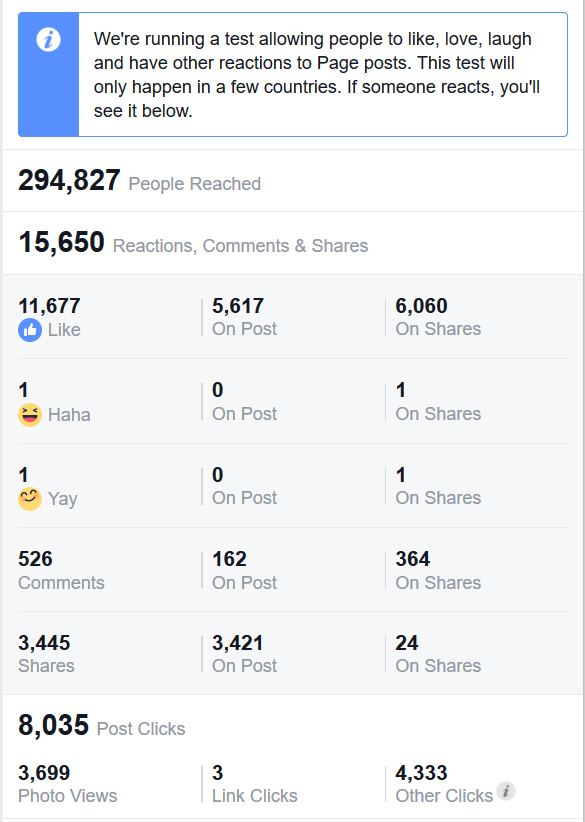
Facebook Reactions are now available on Facebook Page insights.

As a Facebook pages manager I'm always tickled about new features on Facebook because I never know which ones will stick around and which ones won't. Since I have access to so many client Facebook Pages, I usually see the roll-out of new features on one page and not on the others. This is the case with Facebook's latest new feature, "Reactions".

Take a look at this screenshot taken from a client's post insights screen:


This just turned up on one of the more higher reaching posts for the previous week, so I'm not sure how many people have actually had a chance to see that there is a post to react to, but I tracked it down and without disclosing my client (due to privacy issues), here is what it looks like from the timeline:


As you can see, there are no reaction buttons to click so I was unclear how this would look from someone's perspective (not my own).  A quick search on Facebook revealed that users in Ireland and Spain are the only users who will be able to see these reaction buttons. I'll have to check with a former client of mine who is currently in Ireland to see if he can send me a screenshot. :) Stay tuned!


The overall feedback on mentions has been nothing short of brutal, with both Mashable and NPR among some of the many reporting on the overall negative reactions of users. Page mangers like myself, however, will find the added input highly enjoyable with a hot cup of coffee in the morning.

The complete list of all the reactions?  Here is a handy image from Facebook:


Monday, October 5, 2015

Insufficient Permission Error on Facebook Pages 10/5/15

Facebook seems to be experiencing a strange glitch this morning. Probably not so annoying for someone with just one page they check in on every now and then, but for a social media manager like myself, it's quite annoying because this message pops up every time I go to one of my pages.


Insufficient Permission- You do not have the necessary permission for the specified Page to perform the requested action.

So what action am I trying to perform when this message pops up? Basically, just scrolling down the page (which causes Facebook to have to retrieve older posts) will make this message pop up.

A quick google search of this reveals that this is a standard FB message that occurs when you try to do something that is "not allowed" on Facebook such as using your FB page to post to a Group wall for example.

Nothing yet on the Facebook Help Desk with known issues, so I guess I'll wait to see if anyone else experiences this today. Comment below if you do.


Thursday, September 17, 2015

Facebook not working on September 17, 2015

It's hard to believe it's almost been a whole year since the great Facebook crash of 2014 but yet again, it appears that something on Facebook is majorly broken.


No one seems to be tweeting about it yet on Twitter and for me it seems to be on again, off again. We'll keep you updated.

Wednesday, June 11, 2014

June 11, 2014 - Facebook Pages Error - Images won't upload to your Facebook Page

The internet has gone wild this morning because Facebook Pages stopped working. It appears that people are unable to upload photos at this time. Watch the video below for an example:

http://screencast.com/t/fZP3JnZDPaA


Meanwhile, software publishing tool GroSocial yesterday reported that their Facebook API (the software used to access Facebook Pages) was not working properly, causing the software to be unable to post anything at all to pages.

Facebook has declined to give an update as of this posting, but it is clear that the problem has escalated from their change in API to the platform itself.

It is still unclear how many people have been affected by this or how long this will last.

Friday, May 23, 2014

Facebook now tells admins how many people a page post is being "served" to.

In an apparent move to be more transparent about Facebook's Newsfeed algorithm, it appears that the text that shows to administrators under each Facebook page post has changed.

It used to read, "x number of people saw this post" and now it reads, "This post was served to x number of people".


As a page administrator for many high profile pages (and low profile pages for that matter), I can say that this is somewhat a relief.  I can't tell you how many people would ask me why their entire population wouldn't "see" a post that we put out on the page. Many times we were asked if we could do anything to make it better, as though it was something we were doing wrong, until we explained Facebook's Newsfeed Algorithm.

Now it is more apparent that Facebook is choosing which of our content to "serve" up to the people who have liked the page and which content is doomed to sit stagnant on our timeline.

There is hope however, besides the apparent "Boost Post" option where you pay Facebook to make sure your content gets into everyone's newsfeed, and that is to post smart.

Facebook's newsfeed algorithm is based on people's "likes and interests" which they fill out when they create a profile.  It also looks at what types of content people engage with not just on your page but on other pages as well. If you have a tendency to click on video links, then you are going to get a LOT more video links in your newsfeed.

If you have an important message to get out to your followers, you should create content that is in alignment with the best posting types on your page, as shown by your Facebook Page insights.

Here's how:


In this case, it looks like our links are being served to the widest audience, so we should continue with this trend. That is great news since we will soon be starting a website for this page.

Interesting also is that our regular status updates (without images or links) get served to the second widest audience, and photos are a close 3rd.

You can also click the "Top Posts from Pages You Watch" to see how other pages' content is being "served" to their audiences.  Overall, I like this new language, as it makes a lot more sense to people about where their content ends up (besides making nice decorations for their Facebook pages).

What are your thoughts or questions?

Saturday, February 8, 2014

Important changes coming for Admins of Facebook Pages.


Here is one of the side-effects we experience from managing so many Facebook Pages for our clients: we get to see changes to Facebook Pages before other users.  One such example happened this morning when we logged in to manage a client's page.

We had a notification about some interesting changes coming to Facebook Pages starting February 20, 2014 and only for certain users.

According to Facebook:
On a Page post, the name of the person who posted will be listed below the name of your Page next to Posted by. On a Page comment, the name of the person who commented will be listed below the comment next to Commented on by
 Facebook went on to assure users that only people who help manage your Page can see this information. 

You will also be able to see who posted or scheduled posts for your page, taking the guesswork out of who to ask for information.

Apparently it will not affect past posts, only posts that are created after this feature is activated.

My team and I are excited about this feature. Sometimes our clients like to jump on an post and we have a hard time knowing if it was them or one of us. Score one for Facebook!

Friday, November 8, 2013

Facebook Pages Not Loading for Administrators - November 8, 2013

As of 9:45am Central Time on November 8, 2013, we began experiencing a major outage of all 30 pages that we are administrators for. One minute they were working fine, and then suddenly, they wouldn't load into the browser.

We currently have access to our admin panel, activity logs and page settings, but can not get the Timeline to load, nor can we update our pages with any content.

Internet service providers do not seem to play a role in the problem because our administrators use different providers to access the pages on Facebook. Here is a screenshot of what the page looks like when an administrator tries to load access it: 


We have sent a request to our Facebook representative and will let everyone know what the reply is and meanwhile will continue to update this article as we get information.

UPDATE 10:45am November 8, 2013 - 

We have been successful in accessing our admin pages again after one hour of trying. Nothing yet has been issued from Facebook, but we'll update as soon as we know.

Monday, October 21, 2013

10/21/13 - The Day that Facebook BROKE DOWN - Trouble with Groups, Commenting, and Posting on Facebook.

Today will go down in the history books as the day that Facebook broke down. The problems seemed to be coming from the computer at first, but the more we dig, the more we are discovering that this is a wide-spread Facebook issue.

The problems as we see it:


Facebook Groups - users are unable to upload any media nor can they post messages. Admins are unable to add or remove group members nor can they pin or unpin posts from the top of the group.

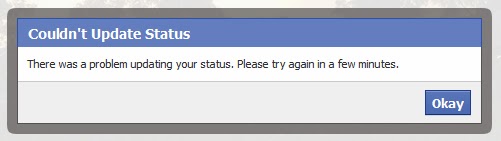
Commenting - users are unable to post comments to their friends posts. The error looks something like this: 


"Likes" not working - error messages also occur when you are trying to like another person's comment.

Posting - users are getting error messages when trying to post status updates. This blog reports that several people are experiencing this message when trying to post an update, but this problem seems to be more sporadic.


How wide-spread is it?


We have several friends all over the country and the world as a matter of fact and all of them are reporting some kind of trouble, although not all of their troubles are the same. This site also indicates that users from all over the world are experiencing issues as well.

What is Facebook doing about it?


So far Facebook has not published anything online about this event. We're curious to see what the issue really is because it isn't just in the United States. Users in Hong Kong are even experiencing these issues.

We tried to file an error report on Facebook's support site and received this error message:

Updates will continue as we learn more.

Update#2:  At 9:44am CST, I attempted to comment on a friend's post that she made on my timeline. It seems the issues will continue to be sporadic.


Update: Looks like most major news outlets have picked up on the outage. They are reporting that things are getting back to normal although posting will be sporadic. Comment below and let us know how things are going for you.

Also, you might want to tune into Facebook's News Room for any updates straight from Facebook (although it seems that they have their hands full and can't get to an announcement just yet).